
Job Search Tracker
$25.00
Most job search tools just log applications. This one also records when answers arrive and whether a person spoke with you, tracks your interviews, agencies, inquiries, and job board profiles, and shows the patterns across your search, so you can decide what to test next.
The Job Search Tracker files every outcome from the dates and contact you record, keeps automated screens apart from human contact, shows what is waiting on you, and compares outcomes across your resume versions, application channels, staffing firms, job levels, and industries. With enough data, the patterns can suggest what to try next. It cannot tell you why any employer decided what it did.
One-time purchase. No subscription. No cloud. Your data stays on your machine.
Description
A fast rejection and a rejection after an interview are different events, and a plain list hides the difference. This tracker keeps them apart so you can see them.
The Job Search Tracker was built by a job seeker who got tired of submitting applications into a void with no way to understand what was happening to them. Many job search trackers are a list. This one adds timing, contact, and outcome comparisons on top of the list, and it tracks the parts of a search that are not applications at all.
What it does:
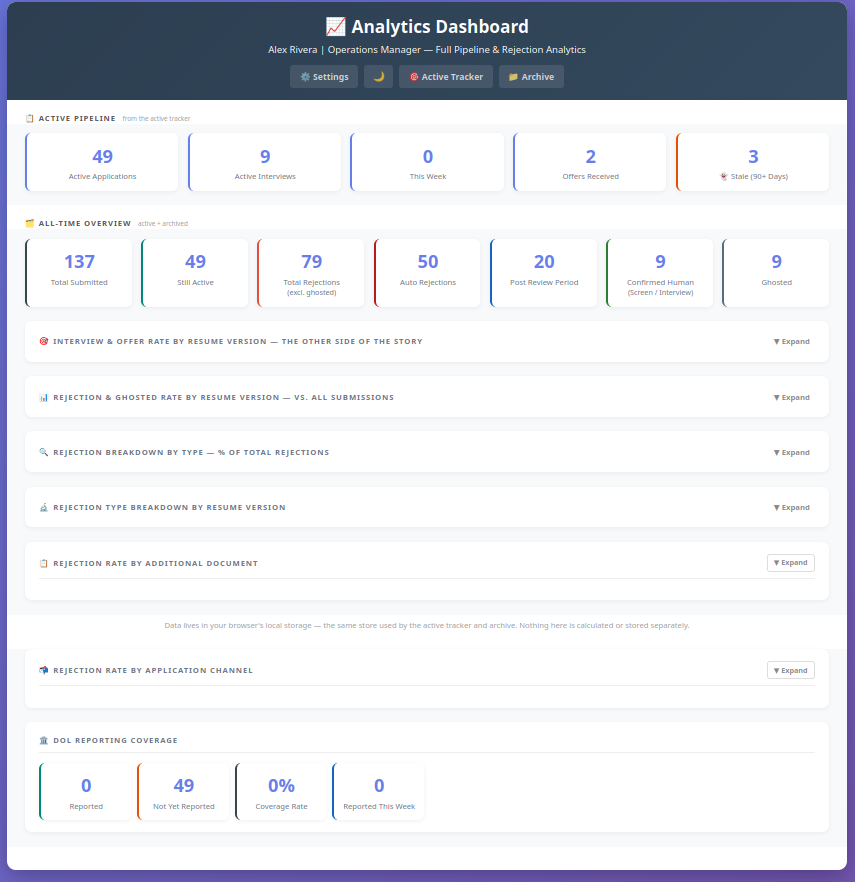
* One page with five tabs: Dashboard, Active, History, Agencies, and Analytics. Records open in a side panel, so you never lose your place
* Tracks four kinds of record: a specific job, an inquiry (a job you asked about but did not apply to), an agency or talent-pool sign-up, and a job board profile. Inquiries and agency contacts are counted on their own, never as applications, so your application numbers stay honest
* An Agencies tab for staffing firms, recruiters, talent pools, and job board profiles, with statuses, recruiter threads, linked jobs, response rate, days to first human contact, and requisitions per firm. A duplicate check flags the same end client and requisition coming from more than one firm
* “Waiting on you” on the Dashboard: assessments to complete, follow-ups due, upcoming interviews, offers awaiting an answer, and agency follow-ups
* Tracks every application with full status history, from submission through offer, rejection, or a closing you choose: Withdrawn by me or Posting closed. None of the closings is counted as a rejection
* Keeps screening steps (assessments, AI voice and chat screens, one-way video) separate from human contact, so an automated screen is never mistaken for a conversation
* Tracks interviews round by round, with the interviewers and follow-ups for each round. Removing an interview never removes the application
* Files every outcome from the dates and contact you record: early (0 to 7 calendar days), later (8 or more), after a recruiter screen, after an interview, no response recorded (ghosted, after 90 days), or ended by mutual agreement
* Shows how many of your applications led to an interview, how many interviews reached a second round or beyond, the median days from application to first interview, and a breakdown of your offers
* Separates where you found a listing (Source) from how you submitted it (Method), including job board quick apply versus the employer’s or firm’s own careers site, with an optional ATS platform field
* Tracks your resumes as base resumes with versions, with optional tailoring fields. When you rewrite a resume, switch to the new version: the old one leaves the dropdown but stays in your history, so every application you already sent still counts. Compare how each version’s outcomes, interview rate, and offer rate differ. It is a comparison to test, not a verdict
* Lets you log the posted pay, field, job level, and industry of each application (all optional), then shows how your applications line up with the level, industries, and pay you said you were aiming for. A reference to look at, not a score
* Supports a bridge search. Set a target pay and, if you want one, a bridge floor, and mark an application as “applying on purpose” when you are taking a job outside your target to keep income coming. It is counted as intentional, and nothing is ever blocked
* Shows your application pace: your average per week, your last four weeks, and your highest and lowest weeks, with a chart
* Shows outcomes by application channel, job board, and staffing firm, with counts and small-sample markers
* Compares applications that included an item you track, such as a cover letter or writing sample, against those that did not. It shows correlation, not cause
* Reactivate a closed record from History when a recruiter comes back. The earlier outcome stays in the record’s timeline
* Flags applications with no recorded activity for 90 days, so nothing disappears unnoticed
* A built-in backup reminder, because your data lives in your browser, and safer saving that checks for changes if the tracker is open in two windows
* Optional DOL reporting module, a personal record-keeping aid for job seekers receiving unemployment benefits: a weekly work-search record following Georgia’s DOL-2798 categories, with print and mark-reported, and an optional weekly minimum you enter for your state. It does not know any state’s rules, submit anything, or verify compliance
* Optional extras, off until you turn them on: Search insights, AI tool comparisons, and status and milestone messages. They describe your own records and are for information only
What makes it different:
Many job search trackers are a list. This one adds timing and outcome comparisons on top of the list, and it keeps applications, inquiries, agency contacts, and automated screens apart so each one is counted for what it is. The analytics show outcome breakdowns by resume version, application channel, job level, and industry, how many applications became interviews, how far those interviews went, how many applications went unanswered, and how your search is trending over time. Patterns tend to be easier to see after a few dozen rejections. That is a rough guide, not a statistical guarantee.
Are most of your rejections arriving within a week? That is a pattern worth testing: keywords, formatting, and where you applied are all places to look. Getting screens but few interviews? Look at how those conversations go. Getting interviews that stop after the first round? That points at the conversation itself, and how your history lines up with what the employer said they needed. Applying well above or below the level you meant to? The tracker will show you that too. It shows where outcomes cluster. It cannot tell you why any employer decided what it did, and what to change is still your call.
What it is:
A self-contained bundle of HTML, JavaScript, and CSS files that runs entirely in your browser. No account required. No subscription. The tracker’s files send no data anywhere and load nothing from the internet. Your application history and your results stay in your browser on your machine, and the tracker reminds you to back them up. It never asks about your savings, runway, or budget.
Download, unzip, and open job-tracker.html in your browser. Tested in Brave, Chromium, and Firefox on Windows and Linux (Ubuntu). Not tested on macOS or Safari.
What’s included:
* The tracker: Dashboard, Active, History, Agencies, and Analytics tabs on one page
* Full configuration via built-in settings: a profile with your experience, target level, industries, and pay; base resumes with versions and custom colors; job board and staffing agency checklists; document types; a Features tab for your weekly goal, agency follow-up days, and the optional extras; DOL module toggle; backup reminder; and data management tools
* Fictional sample data showing every feature, to try in a separate browser profile
* Complete documentation: Quick Start Guide, Full User Guide, How to Read Your Data guide, and EULA
Updates:
Updates are free. This is version 2.0 (October 2026). Download again anytime from My Account to get the latest version. A short changelog is in the README inside the ZIP. To update, export a full backup first, copy all of the files over your old ones (2.0 adds many new files), then open job-tracker.html. Version 2.0 upgrades your data the first time it opens and deletes nothing.
If it doesn’t work for you:
Digital products can’t be returned once downloaded. If something isn’t working, contact admin@workersrebellion.com and we’ll work with you to fix it. If we can’t, we’ll refund you.
$25. One-time purchase. No subscription.
Reviews
There are no reviews yet.